
The IGNOU Assignment Grade Card is a crucial academic document that displays your performance in the assignment component of your courses. Unlike the full grade card that combines assignment marks with Term-End Examination (TEE) scores, the assignment grade card specifically focuses on your internal assessment performance.
Assignments carry 30% weightage in your final subject score, making them a significant contributor to your overall academic standing. Understanding your IGNOU Assignment Grade Card is essential because it helps you track whether your assignments have been evaluated, what marks you received, and whether you have met the minimum passing criteria.
Many students face issues with their assignment marks not showing up, incorrect entries, or delayed updates. This complete guide will walk you through everything you need to know about the IGNOU Assignment Grade Card, including how to check it, download it, understand the status, and resolve common issues.
What is IGNOU Assignment Grade Card?
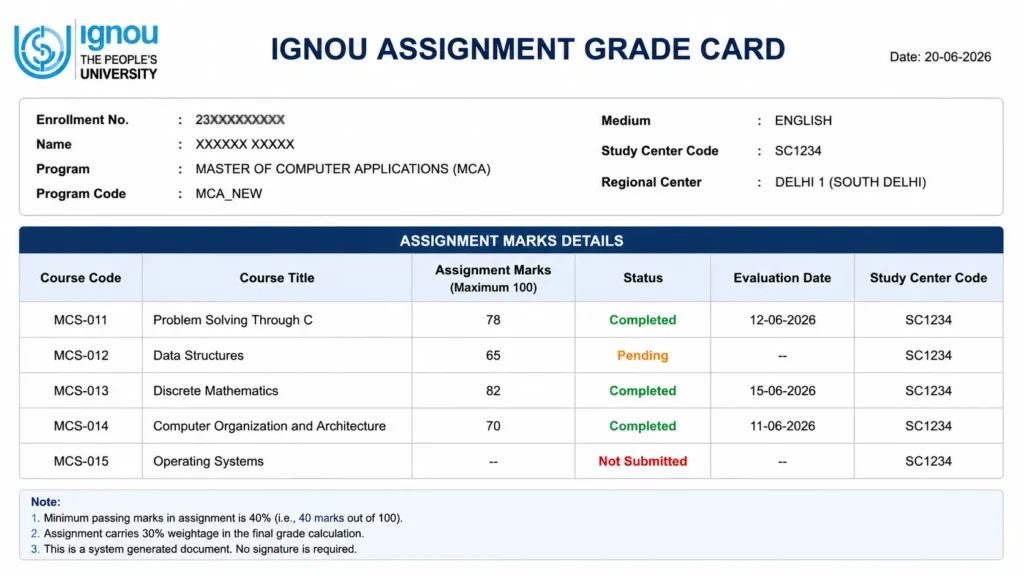
An IGNOU Assignment Grade Card is a dedicated section of your academic record that specifically displays the marks you have obtained in your assignments for each course. It is typically part of the larger grade card but can be accessed separately to check assignment-specific information.
The assignment grade card contains:
| Component | Description |
|---|---|
| Course Code | Subject-specific codes (e.g., BCS-12, MCS-011) |
| Assignment Marks | Marks obtained from submitted assignments |
| Assignment Status | Completed / Not Completed / Pending |
| Evaluation Date | Date when the assignment was evaluated |
| Study Center Code | Code of the center where assignments were submitted |
Why is the Assignment Grade Card Important?
| Purpose | Description |
|---|---|
| Track Assignment Performance | Monitor whether assignments are evaluated and scored. |
| Verify Marks | Ensure correct marks are entered against your enrollment number. |
| Meet Minimum Criteria | Check if you have secured the minimum 40% required in assignments. |
| Plan for Exams | Know your assignment score before appearing for TEE. |
| Re-evaluation Reference | Use for applying for re-evaluation of assignment marks. |
Importance of Assignments in IGNOU
Assignments play a critical role in the IGNOU evaluation system. Here is why they matter:
| Aspect | Details |
|---|---|
| Weightage | 30% of the total subject score |
| Minimum Passing | 40% required in assignments separately |
| Eligibility for TEE | Assignment submission is mandatory to appear for TEE |
| Final Grade Impact | Low assignment scores can pull down overall percentage |
| Backlog Clearance | Pending assignments can delay degree completion |
Assignment Weightage Formula:
Final Subject Score = (Assignment Marks × 30%) + (TEE Marks × 70%)
| Assignment Score | TEE Score | Final Subject Score |
|---|---|---|
| 85 | 70 | (85×0.3) + (70×0.7) = 25.5 + 49 = 74.5% |
| 60 | 60 | (60×0.3) + (60×0.7) = 18 + 42 = 60.0% |
| 40 | 40 | (40×0.3) + (40×0.7) = 12 + 28 = 40.0% |
| 35 | 70 | (35×0.3) + (70×0.7) = 10.5 + 49 = 59.5% |
⚠️ Critical: You need a minimum of 40% in assignments separately to pass a subject, regardless of your TEE score.
How to Check IGNOU Assignment Grade Card
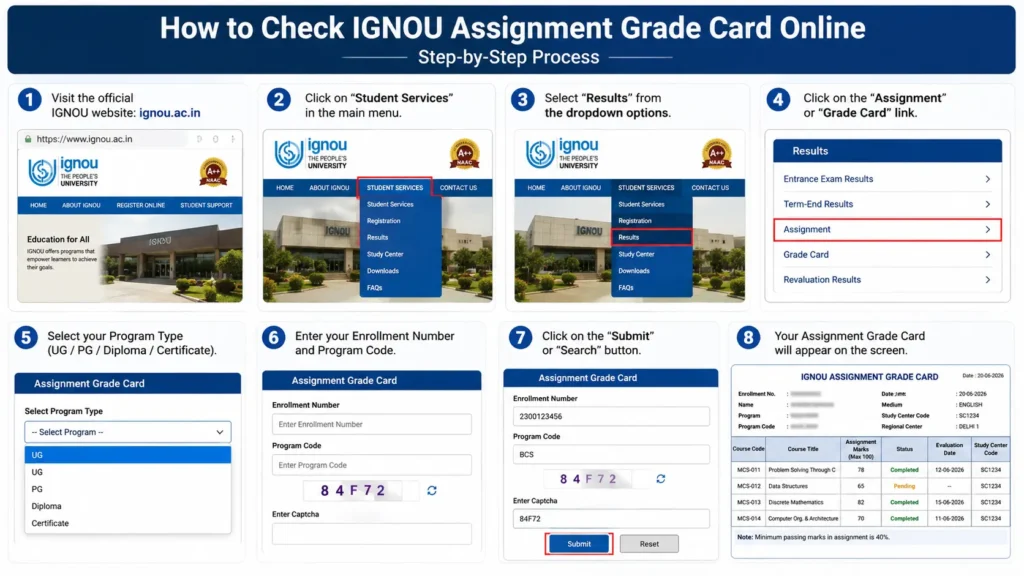
Checking your IGNOU Assignment Grade Card is a simple online process. Follow these steps:
Step-by-Step Process:
| Step | Action |
|---|---|
| Step 1 | Visit the official IGNOU website: ignou.ac.in |
| Step 2 | Click on “Student Services” in the main menu |
| Step 3 | Select “Results” from the dropdown options |
| Step 4 | Click on the “Assignment” or “Grade Card” link |
| Step 5 | Select your Program Type (UG / PG / Diploma / Certificate) |
| Step 6 | Enter your Enrollment Number and Program Code |
| Step 7 | Click on the “Submit” or “Search” button |
| Step 8 | Your Assignment Grade Card will appear on the screen |
Alternative Method:
| Step | Action |
|---|---|
| Step 1 | Visit the dedicated grade card portal: gradecard.ignou.ac.in |
| Step 2 | Select your program type |
| Step 3 | Enter Enrollment Number and Program Code |
| Step 4 | Click Submit to view your grade card |
| Step 5 | Scroll to the assignment section to check marks |
How to Download Assignment Grade Card PDF
Once your IGNOU Assignment Grade Card is displayed on the screen, you can easily save it as a PDF.
Steps to Download:
| Step | Action |
|---|---|
| Step 1 | After your grade card appears on the screen, locate the print/download option in your browser |
| Step 2 | Use Ctrl+P (Windows) or Cmd+P (Mac) to open the print dialog |
| Step 3 | Select “Save as PDF” as the destination |
| Step 4 | Click “Save” and choose a location on your device |
💡 Pro Tip: Always save a copy of your Assignment Grade Card for future reference, especially before TEE exams.
Understanding Assignment Status
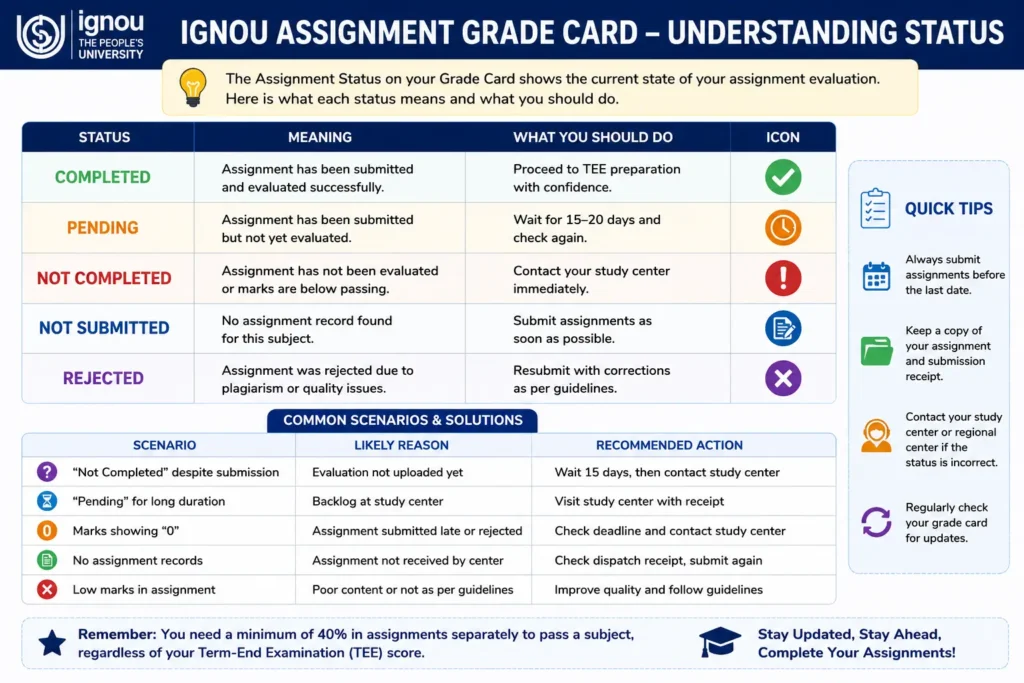
The IGNOU Assignment Grade Card displays various statuses that indicate the current state of your assignment evaluation. Here is what each status means:
| Status | Meaning | What You Should Do |
|---|---|---|
| Completed | Assignment has been submitted and evaluated successfully. | ✅ Proceed to TEE preparation with confidence. |
| Not Completed | Assignment has not been evaluated or marks are below passing. | ❌ Contact your study center immediately. |
| Pending | Assignment has been submitted but not yet evaluated. | ⏳ Wait for 15-20 days and check again. |
| Not Submitted | No assignment record found for this subject. | 📝 Submit assignments as soon as possible. |
| Rejected | Assignment was rejected due to plagiarism or quality issues. | 🔄 Resubmit with corrections. |
Common Assignment Status Scenarios:
| Scenario | Likely Reason | Recommended Action |
|---|---|---|
| “Not Completed” despite submission | Evaluation not uploaded yet | Wait 15 days, then contact study center |
| “Pending” for long duration | Backlog at study center | Visit study center with receipt |
| Marks showing “0” | Assignment submitted late or rejected | Check submission deadline, contact center |
| No assignment records | Assignment not received by center | Check dispatch receipt, submit again |
How to Calculate Assignment Weightage
Understanding how to calculate your assignment contribution is essential for the IGNOU Assignment Grade Card tracking.
The Formula:
Assignment Contribution = Assignment Marks × 30%
Example Calculations:
| Assignment Marks | Weighted Score (30%) |
|---|---|
| 90 | 90 × 0.3 = 27.0 |
| 80 | 80 × 0.3 = 24.0 |
| 70 | 70 × 0.3 = 21.0 |
| 60 | 60 × 0.3 = 18.0 |
| 40 | 40 × 0.3 = 12.0 |
What This Means for Your Final Score:
| Assignment Score | Required TEE Score for 40% Overall |
|---|---|
| 90 (27 weighted) | 40 (13 weighted) → Total 40% |
| 80 (24 weighted) | 40 (16 weighted) → Total 40% |
| 70 (21 weighted) | 40 (19 weighted) → Total 40% |
| 60 (18 weighted) | 40 (22 weighted) → Total 40% |
| 40 (12 weighted) | 40 (28 weighted) → Total 40% |
⚠️ Critical: You need 40% in assignments separately, regardless of your TEE score.
Common Issues & Solutions
1. Assignment Marks Not Showing in Grade Card
Why: Your assignments might not have been evaluated or uploaded by the study center yet.
Solution: Wait for 15-20 days after the assignment submission deadline. If it persists:
- Contact your study center with assignment receipt
- Visit the regional center for assistance
2. Assignment Shows “Not Completed” Even Though You Submitted
Why: Evaluation is pending, or marks are below 40%.
Solution:
- Wait for 15-30 days after submission
- Check if you scored below 40% in assignments
- Contact study center to confirm receipt
3. Assignment Marks are Incorrect
Why: Data entry error, or assignment evaluation error.
Solution:
- Compare with your assignment copy
- Apply for re-evaluation if marks are significantly different
- Contact your study center coordinator
4. Assignment Portal Not Opening / Enrollment Number Not Found
Why: High traffic during result declaration hours.
Solution:
- Try during off-peak hours (late night or early morning)
- Ensure your enrollment number is correct
- Use the direct link: gradecard.ignou.ac.in
5. Assignment Marks Not Updated
Why: The server updates in cycles, or assignments are still under evaluation.
Solution:
- Check after 15-20 days
- Contact your study center for status
- Verify assignment submission receipt
6. Assignment Rejected Due to Plagiarism
Why: The assignment content was not original or properly referenced.
Solution:
- Resubmit with original content
- Include proper citations and references
- Follow assignment guidelines strictly
Assignment Submission Guidelines
To ensure your assignments appear on the IGNOU Assignment Grade Card, follow these guidelines:
| Guideline | Details |
|---|---|
| Deadline | Submit before the last date (usually March and September for June/December sessions) |
| Format | Handwritten or typed (check program-specific requirements) |
| Length | As specified in the assignment booklet |
| Cover Page | Include enrollment number, program code, course code, and study center code |
| Receipt | Always take a receipt or acknowledgment from the study center |
| Copy | Keep a photocopy of all submitted assignments |
| Dispatch | If submitting by post, use registered mail and keep the receipt |
Important Dates for 2026:
| Session | Assignment Submission Deadline | TEE Exams |
|---|---|---|
| June 2026 | March 2026 | June-July 2026 |
| December 2026 | September 2026 | December 2026 |
Assignment Marks vs TEE Marks
Understanding the relationship between assignment marks and TEE marks is crucial for the IGNOU Assignment Grade Card interpretation.
| Aspect | Assignment Marks | TEE Marks |
|---|---|---|
| Weightage | 30% | 70% |
| Maximum Marks | 100 | 100 |
| Passing Requirement | 40% | 40% |
| Impact on Final Score | Lower impact (30%) | Higher impact (70%) |
| Evaluation Method | Internal assessment | External exam |
| Flexibility | Can be submitted multiple times | One attempt per session |
The Combined Effect:
| Scenario | Assignment | TEE | Final Result |
|---|---|---|---|
| Best Case | 90% (27 weighted) | 80% (56 weighted) | 83% ✅ Pass |
| Good Case | 80% (24 weighted) | 70% (49 weighted) | 73% ✅ Pass |
| Borderline | 40% (12 weighted) | 40% (28 weighted) | 40% ✅ Pass |
| Assignment Fail | 35% (10.5 weighted) | 80% (56 weighted) | 66.5% ❌ Fail |
⚠️ Critical: Even if you score 100% in TEE, you will fail the subject if you do not achieve 40% in assignments.
Re-evaluation of Assignment Marks
If you are not satisfied with your assignment marks, you can apply for re-evaluation.
Important Points:
| Point | Details |
|---|---|
| Eligibility | You can apply only if 30-40 days have passed since assignment results |
| Fee | ₹750 per subject (same as TEE re-evaluation) |
| Application | Through the official IGNOU website |
| Result | Usually released within 2-3 months |
How to Apply for Assignment Re-evaluation:
| Step | Action |
|---|---|
| Step 1 | Visit the official IGNOU website: ignou.ac.in |
| Step 2 | Go to “Student Services” → “Re-evaluation” |
| Step 3 | Enter your Enrollment Number and Program Code |
| Step 4 | Select the subjects for which you want re-evaluation |
| Step 5 | Pay the applicable fee online |
| Step 6 | Submit the application and note the reference number |
Frequently Asked Questions
1. What is IGNOU Assignment Grade Card?
The IGNOU Assignment Grade Card is a section of your academic record that displays your assignment marks for each course, along with the evaluation status.
2. How to check IGNOU Assignment Grade Card?
Visit ignou.ac.in → Student Services → Results → Assignment → Enter Enrollment Number and Program Code → Click Submit.
3. What is the weightage of assignments in IGNOU?
Assignments carry 30% weightage in your final subject score.
4. What is the passing marks in IGNOU assignments?
You need a minimum of 40% in assignments separately to pass a subject.
5. Why is my assignment showing “Not Completed”?
This usually means your assignment has not been evaluated yet, or you scored below 40% in assignments.
6. Can I apply for re-evaluation of assignment marks?
Yes, you can apply for re-evaluation by paying ₹750 per subject through the official IGNOU website.
7. How long does it take for assignment marks to appear?
Assignment marks usually appear within 15-30 days after the submission deadline.
8. Can I submit assignments after the deadline?
Late submission may be accepted with a late fee, but it depends on the program and study center policy.
9. What happens if I fail in assignments?
If you fail in assignments (below 40%), you will fail the subject even if you score high in TEE. You must re-submit assignments in the next session.
10. Is assignment grade card the same as the full grade card?
No. The assignment grade card only shows assignment marks, while the full grade card shows both assignment and TEE marks together.
Need to Check Your Assignment Status?
If you want to check your actual assignment status on the official IGNOU server, visit the official student portal.